
Serverless GeoAI: The Architecture Behind CoffeeMap.dev
Two routes, six patterns and one rule for deciding where each computation runs
Three satellite dashboards on CoffeeMap.dev (flood risk on the Blue Nile, urban heat in Riyadh and crop monitoring in Al Jouf) run with no VPS, no database and no Python at runtime. The site is static files on shared hosting. The heavy lifting happens in three places I don't operate or pay for per request: public tile servers, an occasional offline script, and the visitor's own browser.
The constraint that shaped everything
Most geospatial web apps follow the same shape: a server with GDAL, a database with PostGIS, a tile server and something to keep them all running. That is a lot of infrastructure for a single analyst, an NGO team or a field office with a weak connection and no IT department.
So I set one rule for every project: no server of mine at runtime. Anything the page needs must be a static file I host, a public API anyone can call, or code that runs on the visitor's device.
The three articles on each project describe what they do. This one describes the architecture they share, and the one decision that splits them into two routes.
The architecture at a glance
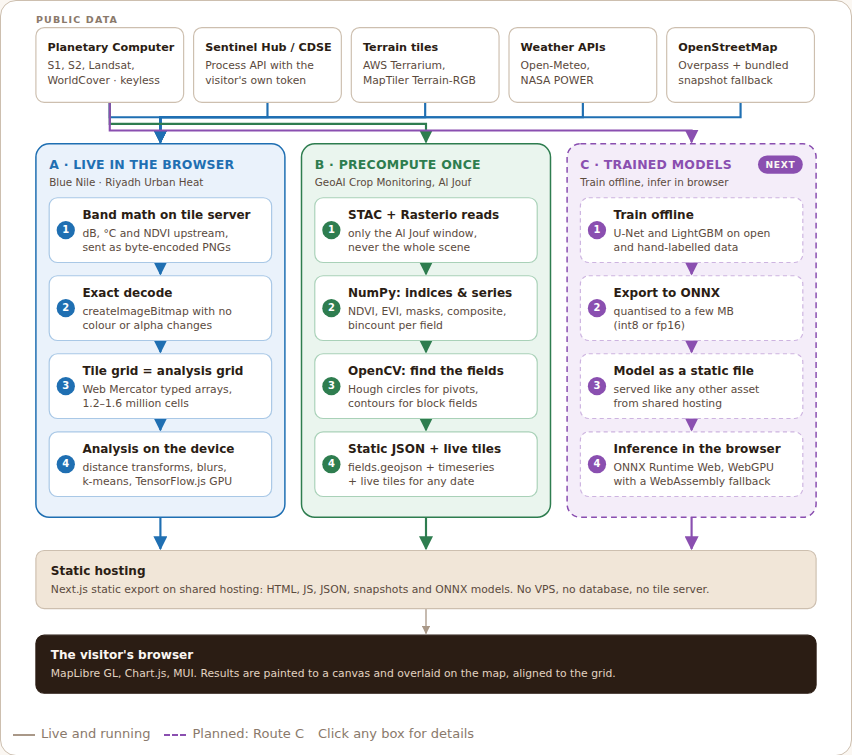
Explore the interactive version of this diagram →
The diagram has four layers:
- Public data. Microsoft Planetary Computer (Sentinel-1, Sentinel-2, Landsat, ESA WorldCover), terrain tiles (AWS Terrarium, MapTiler), weather APIs (Open-Meteo, NASA POWER) and OpenStreetMap through Overpass. All are keyless, except optional sources where the visitor brings their own token.
- Two compute routes. Route A computes everything live in the browser. Route B precomputes once, offline, and streams imagery live.
- Static hosting. A Next.js static export: HTML, JavaScript, JSON and bundled snapshots.
- The visitor's browser. MapLibre GL draws the map, Chart.js the charts, and results are painted to a canvas that overlays the map exactly.
The one decision: where does this computation belong?
Every calculation in these projects answers one question first:
If it depends on the visitor's settings, compute it in the browser. If it is the same for everyone, compute it once and ship it as a file.
| Question | Route A: live in the browser | Route B: precompute once |
|---|---|---|
| Does the result change with user input (dates, thresholds, weights)? | Yes | No, or only the display changes |
| How much data per view? | Dozens of tiles, about a million cells | Years of scenes × thousands of fields |
| Time per view | Seconds (Blue Nile: about 13 s on a laptop) | Would be hours; done once instead |
| Where the heavy maths runs | Tile server band math + the visitor's device | My laptop, occasionally |
| What the host serves | The app | The app + small JSON/GeoJSON files |
| Projects | Blue Nile Flood Risk, Riyadh Urban Heat | GeoAI Crop Monitoring |
Route A: live in the browser
Blue Nile Flood Risk and Riyadh Urban Heat recompute everything on each visit, so visitors can change dates, radar thresholds or model weights and see the result instantly. Four patterns make that possible without a single GIS library in the bundle.
Pattern 1: Band math on the tile server
Planetary Computer's data API evaluates an expression on its own servers and returns a PNG tile. I use that to do the unit conversion upstream and receive values the browser only has to unpack:
# Sentinel-1 backscatter to decibels (Blue Nile)
expression = 10*log10(vv);10*log10(vh);10*log10(vv)
rescale    = -35,5

# Landsat Collection 2 surface temperature to °C (Riyadh)
expression = lwir11*0.00341802+149.0-273.15
rescale    = 10,70
rescale maps the physical range onto the 0–255 byte of a PNG channel. The browser reverses it. The precision cost is small and knowable: about 0.16 dB for radar and 0.24 °C for temperature, both finer than the sensors' own noise.
Pattern 2: Decode exactly
Browsers colour-manage images by default, which is perfect for photos and silently wrong for data. Every data tile is decoded with colour conversion and alpha premultiplication switched off:
const bitmap = await createImageBitmap(blob, {
  colorSpaceConversion: 'none',
  premultiplyAlpha: 'none',
});
Terrain tiles use the same path, with their own decode formulas (Terrarium: h = R × 256 + G + B / 256 − 32768).
Pattern 3: The tile grid is the analysis grid
This is the decision that removes the GIS stack. Instead of choosing a projection and resampling into it, each project analyses data on the Web Mercator pixel grid of one zoom level, the same grid the map tiles already use:
| Project | Zoom | Cell size | Grid | Cells |
|---|---|---|---|---|
| Blue Nile Flood Risk | 9 | about 300 m | about 1,100 × 1,130 | 1.2 million |
| Riyadh Urban Heat | 11 | about 70 m | 1,456 × 1,117 | 1.6 million |
Every tile pixel lands on exactly one cell: no reprojection library, no resampling. Layers live in typed arrays (Float32Array, Uint8Array), a dozen layers at a time, comfortably inside browser memory. When a result is ready, it is painted to a canvas and added to MapLibre as an image source with four corner coordinates, and it lines up perfectly.
Pattern 4: Algorithms that scale linearly
With a million cells, anything slower than linear time is noticeable. The workhorses are:
- Exact Euclidean distance transforms (Felzenszwalb & Huttenlocher) in two 1-D passes: distance to rivers, parks or canopy, plus which feature is nearest.
- Separable box blurs with running sums: neighbourhood shares such as canopy within a 300 m walk.
- k-means with quantile initialisation: repeatable heat hotspots.
- TensorFlow.js as a GPU engine: scoring 1.6 million cells as one matrix product through WebGL, loaded only on the page that needs it.
Route B: precompute once, stream live
Crop monitoring in Al Jouf follows every field through every Sentinel-2 scene since April 2023. That is far too much work to repeat for each visitor, and the answer is the same for everyone. So the work is split.
Pattern 5: Offline pipeline, static outputs
An offline Python pipeline, run occasionally, does the heavy lifting. Three libraries carry it, each with one job: Rasterio fetches the pixels, NumPy does the maths, OpenCV sees the shapes.
| Library | Its job | What it does in the Al Jouf pipeline |
|---|---|---|
| Rasterio | Read rasters with their georeferencing | Windowed reads of Sentinel-2 cloud-optimised GeoTIFFs over HTTP: only the rectangle over Al Jouf, band by band (B02, B04, B08 and the SCL cloud mask), never the whole scene. Every array stays tied to real-world coordinates. |
| NumPy | Maths on whole images at once | Removes the +1000 offset and scales reflectance to 0–1, computes NDVI and EVI for every pixel, applies the cloud mask, builds the maximum-NDVI composite, and uses np.bincount to average every field's pixels in one pass. No loops over pixels or fields. |
| OpenCV | Computer vision: find shapes in an image | Treats the NDVI composite like a photo: HoughCircles finds round pivots, morphology cleans noisy green areas, connectedComponentsWithStats separates vegetation blocks, and findContours with approxPolyDP turns them into polygon outlines. |
They hand off in one chain, with pystac-client finding the scenes first and Shapely and pyproj turning shapes into mapped polygons:
pystac-client  find Sentinel-2 scenes in the STAC catalogue
  → Rasterio   read only the Al Jouf window of each band
  → NumPy      NDVI, EVI, cloud mask, maximum-NDVI composite
  → OpenCV     detect centre pivots and block fields
  → Shapely + pyproj   polygons, areas, WGS 84
  → NumPy      mean NDVI/EVI per field, per date
  → fields.geojson + timeseries.json
Results are cached, so a rerun only processes new scenes. The two output files are uploaded next to the app like any other asset. None of these libraries ever runs on the website; the browser only receives what they produce.
One honest note: OpenCV here is classical computer vision, hand-tuned rules with no training data. It works well because centre pivots are near-perfect circles. The next step is a trained segmentation model for irregular and sector-shaped fields, with the Hough detector as the baseline to beat.
Pattern 6: Keep the imagery live
The pipeline stores numbers, not pictures. When a visitor moves the time slider, the map asks Planetary Computer for that date's NDVI, EVI or true-colour tile, rendered with band math and a colour map on the tile server. The site never stores a single satellite image, yet every date is one request away.
Designing for the real internet
Public services are free, not guaranteed. Four habits keep the dashboards working:
- Snapshots first, live second. The Blue Nile page ships a bundled OpenStreetMap river snapshot and swaps in live Overpass data when a mirror answers. During development I saw 504 errors and an 85-second response.
- Say when there is no data. Sentinel-1 coverage over Sudan is patchy in some years, so the page reports empty date windows instead of drawing an empty map.
- The visitor's credentials stay with the visitor. Sentinel Hub and Copernicus Data Space logins run in the browser (both token endpoints allow CORS). Nothing is stored, and no key of mine is ever in the bundle.
- Pay for heavy libraries only where they are used. TensorFlow.js and map components load on their own pages only.
What this architecture is not good at
Being honest about the trade-offs is part of the design:
- National scale. A browser handles a few million cells, not a country at 10 m. That work belongs in Route B.
- Someone else's uptime. If Planetary Computer or Overpass is down, Route A waits. Snapshots soften this; they don't remove it.
- Rate limits and fair use. Keyless APIs are shared. A popular page must cache responsibly and respect each service's terms.
- Proprietary or sensitive data. Everything the browser receives, a visitor can see. Confidential data needs a different design.
- Device variety. A laptop takes seconds; an old phone takes longer. Grids and zoom levels are chosen with that in mind.
What's next: Route C, trained models in the browser
Today, the "models" in these projects are transparent rules and weighted indices. That is deliberate for screening tools, but the next step is trained models, and the architecture already has a place for them:
- Train offline on open benchmarks and hand-labelled local data (a flood-segmentation U-Net, a crop-type classifier).
- Export to ONNX and quantise to a few megabytes.
- Ship the model as a static file, like any other asset.
- Run inference in the browser with ONNX Runtime Web on WebGPU, falling back to WebAssembly.
Training is Route B; inference is Route A. The rule stays the same: no server of mine at runtime.
The projects
- Blue Nile Flood Risk: Sentinel-1 flood detection and risk for Sennar and Gezira, Sudan. Read the article.
- Riyadh Urban Heat: heat exposure and tree canopy equity across 1.6 million cells. Read the article.
- GeoAI Crop Monitoring: centre pivots, crop types and anomaly alerts in Al Jouf. Read the article.
If you run a team that needs satellite analysis without infrastructure to maintain, for humanitarian response, agriculture or urban planning, get in touch at [email protected].
Data: Copernicus Sentinel-1 and Sentinel-2 (ESA), Landsat 8/9 (USGS) and ESA WorldCover via Microsoft Planetary Computer; AWS Terrain Tiles; MapTiler; Open-Meteo; NASA POWER; © OpenStreetMap contributors.