
Flood Risk Mapping on the Blue Nile, Entirely in the Browser
Sentinel-1 radar, terrain, rainfall and OpenStreetMap rivers, combined on the client with no server
For the record flood of September 2020, the dashboard detects about 172 km² of new flood water along the Blue Nile around Sennar and Gezira. Radar download, terrain decoding, distance transforms and the risk model all run in the visitor's browser, in roughly 13 seconds on a laptop.
Open the Blue Nile Flood Risk dashboard →
Why build it this way
Flood mapping usually means a remote-sensing workstation, a Python environment with GDAL, and a server to publish the result. That is a lot of infrastructure for a field office, an NGO team or a student in Sudan.
So I tried the opposite: no backend, no VPS, no Python at runtime. The page is static files on shared hosting. Every raster comes from a public API, and every calculation, from decoding elevation to detecting flood water in radar, runs on the visitor's device.
The study area is the Blue Nile around Sennar and Gezira (32–35° E, 12–15° N): about 330 × 330 km of flat clay plain, home to the Gezira irrigation scheme, where the 2020 flood was the worst on record.
What it found
| Measure (default event) | Value |
|---|---|
| Flood date vs baseline | September 2020 vs July 2020 |
| New flood water detected | about 172 km² |
| Analysis grid | about 300 m cells, 1,100 × 1,130 (1.2 million cells) |
| Radar read at | about 150 m |
| Full pipeline time | about 13 seconds on a laptop |
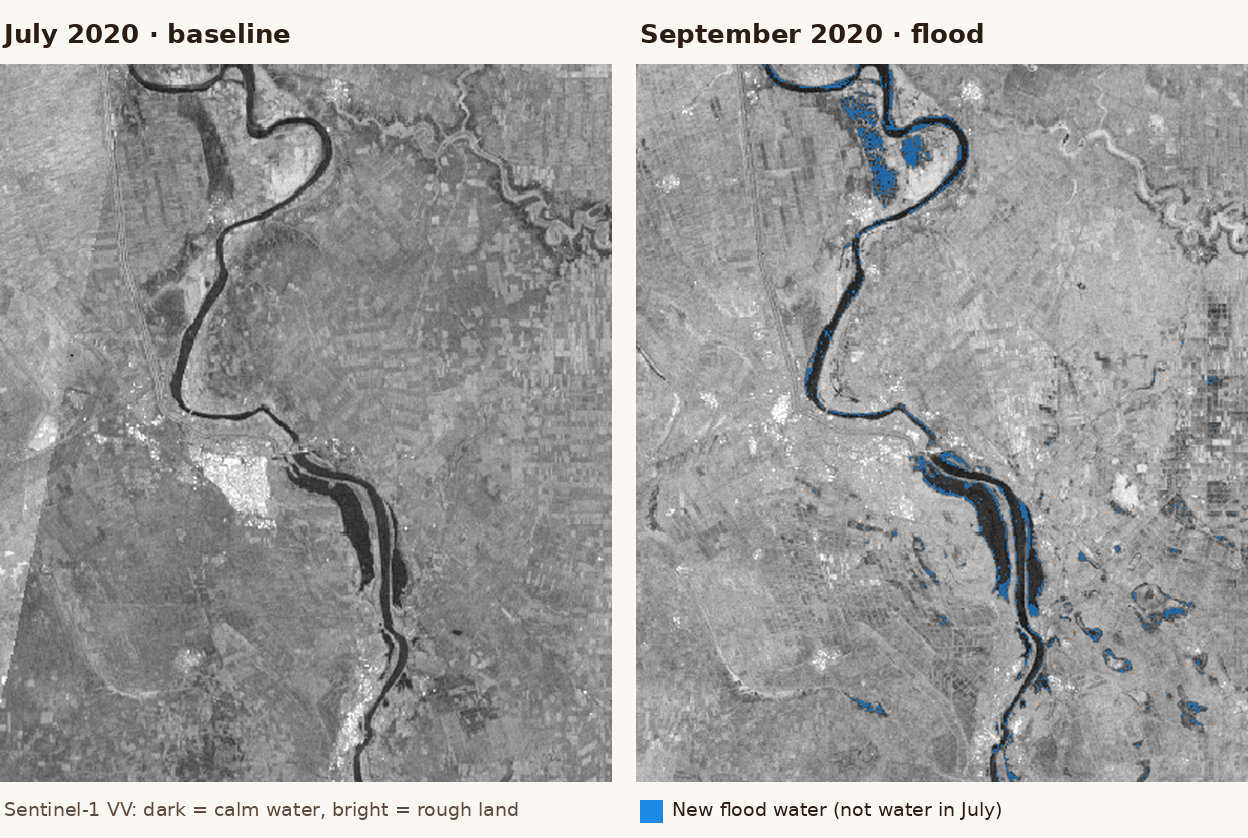
Zoomed in near Sennar, the Blue Nile shows as permanent water, with flooded patches spreading along its banks.
How it works
- Fetch Sentinel-1 radar for a baseline date and a flood date, terrain tiles, rainfall and the river network.
- Decode every tile onto one shared grid, with no reprojection.
- Derive slope, distance to the nearest river and height above that river.
- Detect water on both dates, then separate new flood water from permanent water.
- Score each cell with a transparent, weighted risk model.
- Paint the result onto the map; change any slider and recompute instantly.

The stack
| Layer | Library / service | Role |
|---|---|---|
| Framework | Next.js 14, React 18, TypeScript | Static page, state, UI |
| UI | Material UI 5 | Sidebar, sliders, stat tiles |
| Map | MapLibre GL JS 5 via react-map-gl 8 | WebGL map, hillshade, raster and vector overlays |
| Radar | Microsoft Planetary Computer (Sentinel-1 RTC), or Sentinel Hub / Copernicus Data Space Process API | VV/VH backscatter |
| Terrain | AWS Terrain Tiles (Terrarium) or MapTiler Terrain-RGB | Elevation |
| Rainfall | Open-Meteo historical weather API | Daily precipitation |
| Rivers | OpenStreetMap via the Overpass API | River network |
| Processing | Plain TypeScript on typed arrays, Canvas 2D, createImageBitmap | Decoding, distance transforms, the model |
There is no GIS library in the bundle: no GDAL, no proj4, no GeoTIFF parser. The grid makes that possible.
One grid that matches the map
Every analysis layer lives on the Web Mercator pixel grid of a single zoom level, clipped to the study area. At zoom 9 that is about 300 m per cell.
Because map tiles use exactly the same grid, each tile pixel lands on exactly one cell: no reprojection, no resampling. When a result is painted to a canvas, it drops onto the map as a MapLibre image source with four corner coordinates and lines up perfectly.
Getting raw values out of a tile is the only subtle part. Browsers colour-manage images by default, which silently corrupts encoded data, so tiles are decoded with:
const bitmap = await createImageBitmap(blob, {
  colorSpaceConversion: 'none',
  premultiplyAlpha: 'none',
});
ctx.drawImage(bitmap, 0, 0);
const pixels = ctx.getImageData(0, 0, bitmap.width, bitmap.height);
Elevation from RGB
Terrain tiles store height in their colour channels. The browser decodes every pixel into a Float32Array:
- Terrarium (AWS, keyless): h = R × 256 + G + B / 256 − 32768
- Mapbox / MapTiler Terrain-RGB: h = (R × 65536 + G × 256 + B) × 0.1 − 10000
Slope comes from central differences, using each row's true cell size (Mercator cells shrink towards the poles). For flood risk, absolute elevation matters less than height above the nearest river, a simplified version of the HAND (Height Above Nearest Drainage) index. That needs the rivers first.
Rivers and an exact distance transform
The river network comes live from OpenStreetMap through Overpass. Public Overpass servers are often busy; during development I saw 504 errors and an 85-second response. So the page starts from a bundled snapshot and swaps in the live result when a mirror answers.
River lines are rasterised onto the grid. Then an exact Euclidean distance transform (Felzenszwalb & Huttenlocher) runs in two 1-D passes over the 1.2 million cells. It returns both the distance to the nearest river and which river cell that is, so height above the river comes almost for free.
The river's reference level is box-blurred over 7.5 km so that it does not jump where two rivers' catchments meet.
Flood detection in radar, in the browser
Sentinel-1 radar sees through cloud, which is exactly when floods happen. Calm water acts like a mirror: it reflects the radar pulse away from the satellite (specular reflection), so it appears very dark in both VV and VH polarisations.
Keyless by default. Planetary Computer's sentinel-1-rtc collection can be searched and mosaicked without an account. The page registers a STAC search (area, date window, most recent scene first) and requests tiles with a server-side band-math expression that converts backscatter to decibels and scales it into a byte:
expression = 10*log10(vv);10*log10(vh);10*log10(vv)
rescale    = -35,5
nodata     = -32768
A 40 dB range over 256 levels gives a precision of about 0.16 dB, well below the noise in the radar itself. The browser turns each byte back into dB and applies the rule:
water           = VV < threshold AND VH < threshold
flood           = water on the flood date AND NOT water on the baseline date
permanent water = water on both dates
With credentials. Visitors with a Sentinel Hub or Copernicus Data Space account can switch source. An evalscript returns VV/VH in dB for the whole grid in one Process API call. The OAuth client-credentials login runs in the browser (both token endpoints allow CORS), and nothing is stored.
A lesson from testing. At 300 m, the tile server averages the river with its banks, and the Blue Nile stops looking like water: about −16 dB instead of −20 to −25 dB. The fix was to read radar one zoom finer (about 150 m) and give the model the share of each cell that is water, rather than a yes/no.
Rainfall without a key
CHIRPS and GPM IMERG have no API a browser can call anonymously, so rainfall comes from Open-Meteo. One request covers a 7 × 7 lattice of points (49 locations); totals are summed over the chosen window and interpolated bilinearly to every cell.
A transparent risk model
Each factor is scaled to 0–1, where 1 means more flood-prone:
- low height above the nearest river;
- flat slope;
- closeness to a river (exponential decay);
- rainfall relative to the rest of the area;
- the share of the cell detected as water in radar.
The risk score is a weighted mean, binned into Low, Medium, High and Very High. The weights are expert-set and adjustable, not learned from data. Every weight and both radar thresholds are sliders, and Recompute Risk reruns the model instantly because everything is already in memory.
Limitations
This is a screening model, not a calibrated hazard map. Read it with these limits in mind:
- Not yet validated. The 172 km² has not been compared with independent flood maps of the 2020 event, such as UNOSAT's analyses.
- Thresholds miss some water. Flooded vegetation and flooded buildings can look bright, not dark, in radar, so they are under-detected.
- And catch some non-water. Very smooth dry surfaces and radar shadow can look dark and be mistaken for water. Comparing against a baseline date removes most of these.
- Coarse cells. At 150–300 m, narrow channels and small flooded fields blur into their surroundings.
- Simplified HAND. Height is measured to the nearest river in a straight line, not along the path water would actually flow.
- Global terrain. Free elevation tiles carry metres of noise, which matters on a plain this flat.
- Coarse rainfall. Open-Meteo's historical data comes from gridded reanalysis, much coarser than the analysis grid.
- Patchy radar coverage. Sentinel-1 coverage over Sudan is uneven in some years; the page tells you when a date window has no scenes.
What I learned
- Public, CORS-enabled APIs are enough for serious remote sensing. Planetary Computer, AWS Terrain Tiles, Open-Meteo and Overpass cover radar, terrain, weather and vectors without a single key.
- Align to the tile grid and you can skip an entire GIS stack.
- Server-side band math plus byte encoding is a powerful pattern. The server does the heavy raster maths; the browser receives compact PNGs it can decode exactly.
- Plan for flaky services with mirrors and snapshots.
- Resolution changes the answer. The river "disappeared" at 300 m; water share at 150 m brought it back.
What's next
- Replace thresholds with a trained model. A small U-Net trained on the Sen1Floods11 benchmark (11 flood events worldwide, none in Sudan), tested on hand-labelled Sudan 2020 scenes and run in the browser with ONNX Runtime Web. The dashboard will show thresholds and model side by side, with their accuracy.
- Validate against independent maps of the 2020 flood and publish the comparison.
- Add exposure. Count people (WorldPop) and irrigated fields in the Gezira scheme inside each risk class, so the map answers "who and what is at risk", not only "where".
If you work on flood preparedness or humanitarian response in Sudan and want this for another river or season, get in touch at [email protected].
Open the Blue Nile Flood Risk dashboard →
Data: Copernicus Sentinel-1 via Microsoft Planetary Computer and Sentinel Hub / Copernicus Data Space; AWS Terrain Tiles; MapTiler; Open-Meteo; © OpenStreetMap contributors.