
A Practical QA/QC Workbench for Geospatial Data
What to check, how to check it, and which standard says so, for four common geospatial products
The QA/QC Workbench is a free, interactive guide for checking a delivered geospatial dataset against its specification. It covers orthoimage mosaics, elevation models, topographic vector data and land cover maps. For every step it shows what to check, how to do it in ArcGIS Pro, QGIS and code, and which ISO 19157-1 quality element the check tests.
Why this exists
Most guidance on geospatial data quality sits at one of two extremes. Standards such as ISO 19157-1 define quality precisely, but they don't tell you which tool to open on a Tuesday morning. Software documentation explains every tool, but not which ones matter for accepting a delivery.
The workbench connects the two. Each check is tied to a named tool in ArcGIS Pro and in QGIS, a code snippet, and the quality element it measures. The result is a report that says "omission 1.8% on a random sample of 125 grid cells", not "some buildings seem to be missing".
What's inside
| Section | What it gives you |
|---|---|
| Workflow by product | 5–6 steps each for orthoimagery, DEM (DTM/DSM), topographic vector data and land cover |
| Error gallery | 22 illustrated errors, each linked to the step that catches it |
| Calculators | Sample size (ISO 2859-1), positional accuracy (RMSE, CE90, LE90), land cover confusion matrix |
| ISO quality elements | The six ISO 19157-1 elements with plain definitions and product examples |
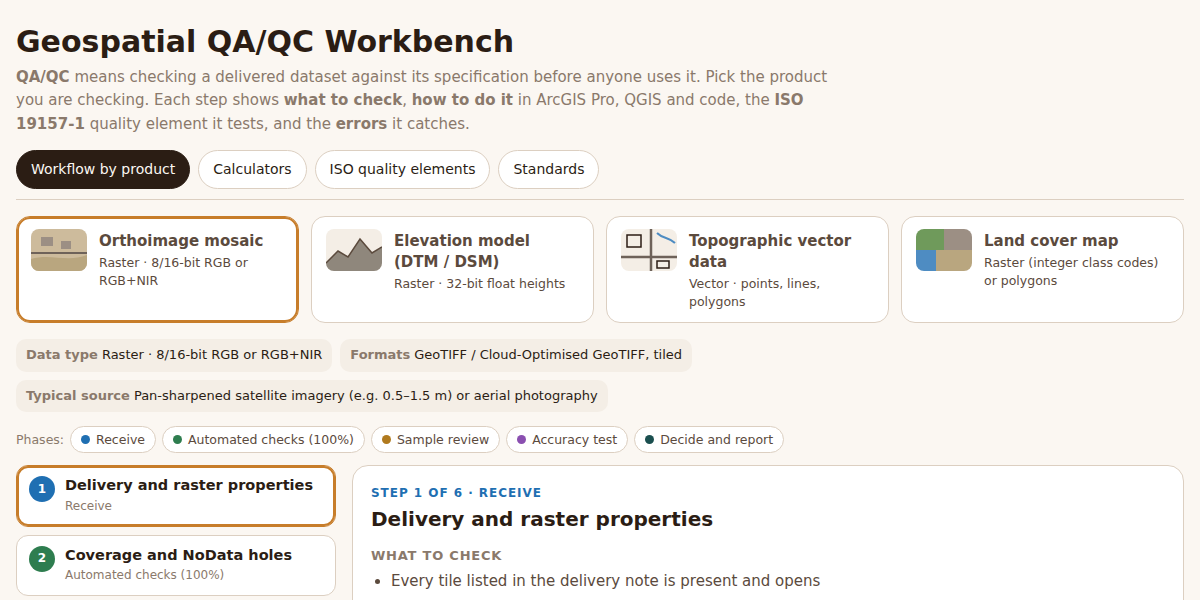
One process, five phases
Every product follows the same five phases. Only the checks inside them change.
- Receive. Is the delivery complete and readable? Right CRS, pixel size, schema, domains, metadata.
- Automated checks (100%). Rules that software can run on every feature or pixel: geometry validity, topology, domains, voids, spikes.
- Sample review. What only a person with a reference image can judge: omissions, commissions, classification, seamlines, terrain logic.
- Accuracy test. Positional accuracy against independent check points, or thematic accuracy from a confusion matrix.
- Decide and report. Pass or fail per check, a defect layer for the producer, and results recorded in the metadata.
The split between phases 2 and 3 matters. Automated rules are cheap, consistent and complete, but they only test structure. A perfectly valid building polygon can still be a building that doesn't exist.
The four products
Orthoimage mosaic
Raster tiles (GeoTIFF or COG) from pan-sharpened satellite or aerial imagery. The checks cover raster properties, coverage and NoData holes, radiometry (cloud, saturation, colour balance), seamlines and ortho distortions, and positional accuracy.
A typical automated check is the share of saturated pixels per tile:
import numpy as np, rasterio
with rasterio.open("tiles/T0412.tif") as r:
    a = r.read(masked=True)
print("saturated %", round((a == 255).sum() / a.count() * 100, 2))
Elevation model (DTM / DSM)
32-bit float heights. Beyond voids and tile-edge steps, the key checks are blunders (spikes and pits found against a local median) and terrain logic. In a DTM, bridges must be removed so rivers aren't dammed, and lakes must be flat. Vertical accuracy is reported as RMSEz and LE90 against GNSS points on open ground.
Topographic vector data
Roads, buildings, hydrography and points of interest in a file geodatabase or GeoPackage. This is where topology does most of the work. In ArcGIS Pro, a geodatabase topology with rules such as Must Not Overlap and Must Not Have Dangles; in QGIS, the Topology Checker; in PostGIS, a few lines of SQL:
SELECT a.id, b.id FROM buildings a
JOIN buildings b ON a.id < b.id AND ST_Overlaps(a.geom, b.geom);
Completeness is then judged by overlaying the vectors on the orthoimage in randomly sampled grid cells, counting omissions and commissions.
Land cover map
Integer-coded rasters or polygons. After checking the legend and cleaning up salt-and-pepper noise, the heart of the evaluation is a stratified random sample labelled blind, and a confusion matrix. The matrix gives overall accuracy, plus user's and producer's accuracy for every class.
Sampling: inspect the right number, at random
Manual review can't cover every feature, and it shouldn't try. ISO 2859-1 gives a sample size and an acceptance number from three inputs: the lot size, the inspection level and the acceptable quality limit (AQL). For example, a lot of 2,400 grid cells at general inspection level II and AQL 1.0 means inspecting 125 cells and accepting the lot if 3 or fewer are defective.
The workbench's calculator does this lookup, and both ArcGIS Pro (Subset Features) and QGIS (Random selection) can draw the random sample.
Five rules that make QA/QC trustworthy
- Fix tolerances before inspection. A tolerance agreed after seeing the results is a negotiation, not a standard.
- Keep check points independent. Points used to produce the data can't be used to test it.
- Report the measure with the number. "3% omission" means little without "on a random sample of 125 of 2,400 cells".
- Re-inspect with a fresh sample after a rejection, not only the items already reported.
- Log every defect with location, type and severity, so producers can fix causes, not just symptoms.
Standards behind it
ISO 19157-1 (data quality), ISO 19131 (data product specifications), ISO 19110 (feature cataloguing), ISO 19115-1 (metadata), ISO 19158 (quality assurance of data supply) and ISO 2859-1 (sampling by attributes).
Tolerances in the workbench are marked as examples; real values always come from each product's specification. The example data in the calculators is invented for demonstration. The workbench describes general practice, not the procedure of any particular organisation.
Built the CoffeeMap way
Like every tool on this site, the workbench is a single static page. No server, no login, no data leaves your browser. It's free to use for training, onboarding new QC staff, or as a checklist on your next delivery.
If you run QA/QC for mapping, surveying or remote sensing projects and want to adapt this workflow for your team, get in touch at [email protected].